Access Methods
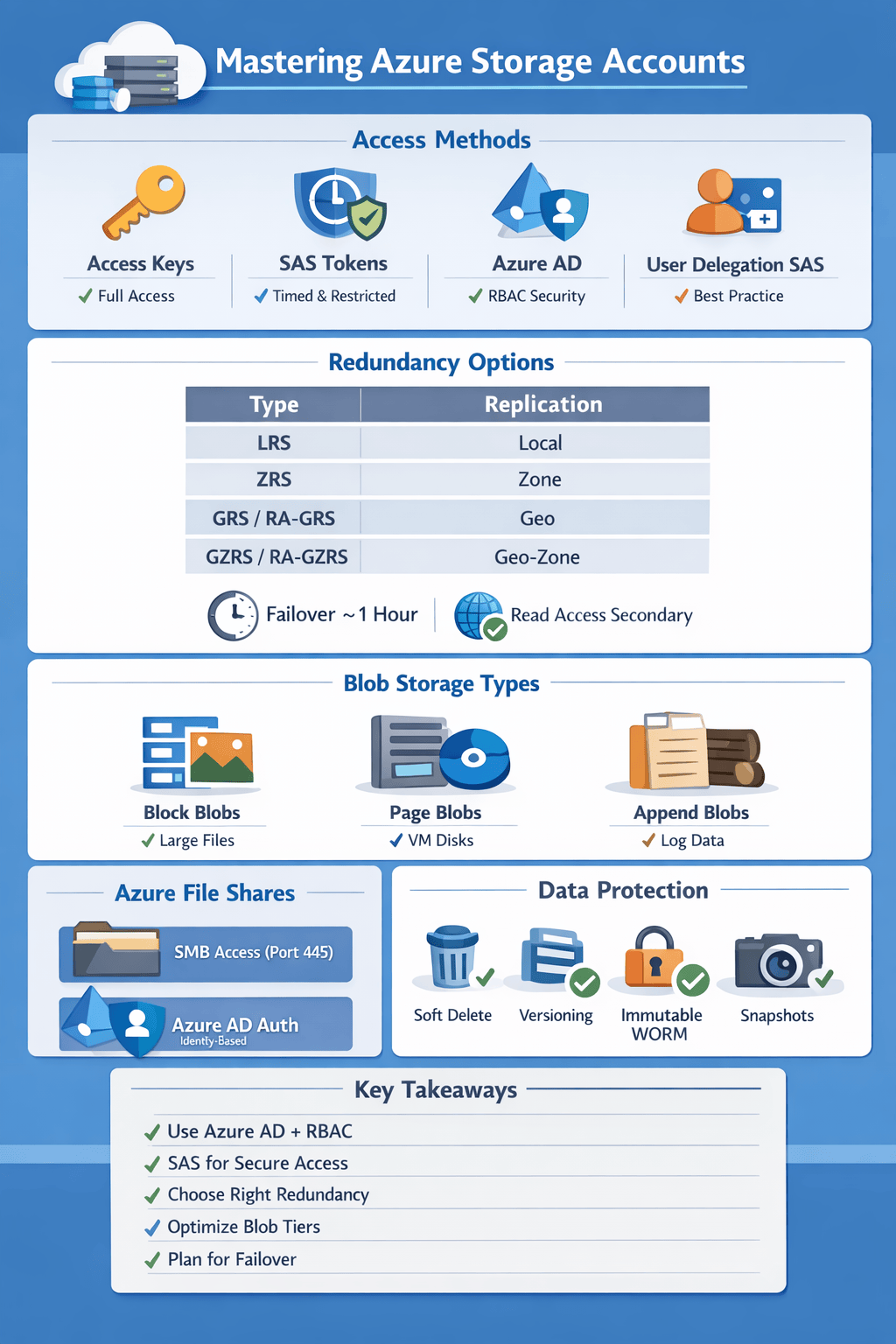
Azure provides multiple ways to access storage accounts, each with different levels of granularity and security.
| Name | Granularity | Revoke | Features | Preferred |
| Access Keys | Account level | Full access only | 3 | |
| Shared Access Signatures (SAS) | Account, Container, Object | Choose required privileges, better integrated with user account management | Can be done if the Stored Access Policy is used | 2 |
| Active Directory | Account, Container, Object | Revoke RBAC or block user | Choose required privileges, better integrated with user account management | 1 |
User Delegation SAS
- A SAS token for accessing a container or blob can be secured using either Azure AD credentials or an account key.
- A SAS secured with Azure AD credentials is called a user delegation SAS, because the OAuth 2.0 token used to sign the SAS is requested on behalf of the user.
- Microsoft recommends that you use Azure AD credentials when possible as a security best practice, rather than using the account key
Redundancy
Azure offers multiple replication strategies to ensure durability and availability:
| Name | Description | Synchronicity |
| LRS | Locally Redundant Storage | Synchronous |
| ZRS | Zone Redundant Storage | Synchronous |
| GRS/RA-GRS | Geo Redundant Storage | Asynchronous |
| GZRS/RA-GZRS | Geo Zone Redundant Storage | Asynchronous |
- RA stands for Read Access. In RA-GRS and RA-GZRS, the data in the secondary region is accessible for reading.
- Failover is supported with GRS AND RA-GRS
- Failover typically takes an hour.
Change replication setting
- may require a manual migration
- When using live migration, this is only supported for storage accounts that use LRS or GRS replication. If the storage account uses RA-GRS, then you need to first change your account’s replication type to either LRS or GRS before proceeding.
Supported storage account types
For most modern workloads, General-purpose v2 is the best choice.
| LRS | ZRS | GRS/RA-GRS | GZRS/RA-GZRS |
| General-purpose v2 General-purpose v1 Premium block blob Legacy blob Premium file shares | General-purpose v2 Premium block blobs Premium file shares | General-purpose v2 General-purpose v1 Legacy blob | General-purpose v2 |
Hierarchical Namespace
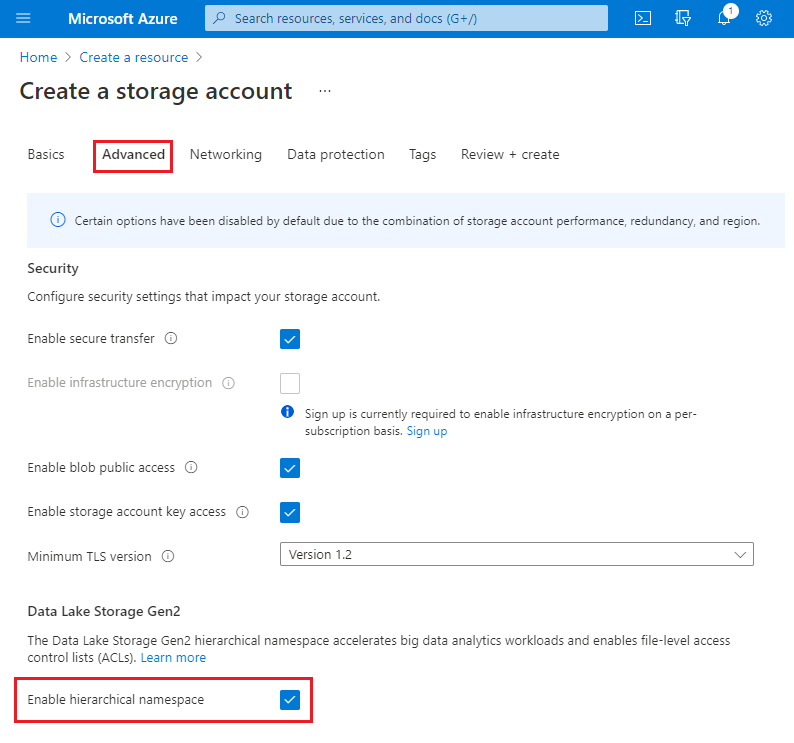
Standard blob storage supports directories; however, these are virtual, so this means that when operating on a directory (such as renaming it), you need to update every file.
Blobs
- Block Blobs: For large objects that don’t use random read and write operations, e.g. Pictures.
- Page Blobs: Optimised for random read and write operations, e.g. VHD. Page size is 512 bytes
- Append Blobs: Optimised for append operations, e.g. log files.
Blob Access tiers
To optimise cost vs performance:
- Premium → high-performance SSD-backed
- Hot → frequent access
- Cool → infrequent access
- Archive → rarely accessed, lowest cost
Encryption
- Encrypted at rest by default
- Encrypt in transit by turning on HTTPS
File Shares
Ways to access:
- Mounted drives
- Uses SMB protocol over port 445
- Authentication
- Active Directory
- Storage account Key (SAS not supported)
- Connecting to a share using the storage account key is only appropriate for admin access. Mounting the Azure file share with the Active Directory identity of the user is preferred.
- Azure File Sync
- Azure File Sync transforms Windows Server into a quick cache of your Azure file share.
- Use Azure File Sync to centralise your organisation’s file shares in Azure Files, while keeping the flexibility, performance, and compatibility of an on-premises file server.
Authentication for Mounted drive (SMB):
- Azure AD
- Azure Active Directory authentication is possible if the machine that needs access to the file share is a domain-joined Windows-based VM hosted on Azure.
- Azure Files supports identity-based authentication over Server Message Block (SMB) through on-premises Active Directory Domain Services (AD DS) and Azure Active Directory Domain Services (Azure AD DS).
- Preferred over shared key
- You can enforce more granular control over file access based on role-based access.
- On-premises discretionary access control lists (DACLs) can be copied, along with the files, over SMB to preserve a company’s existing permissions.
- Storage Account Key
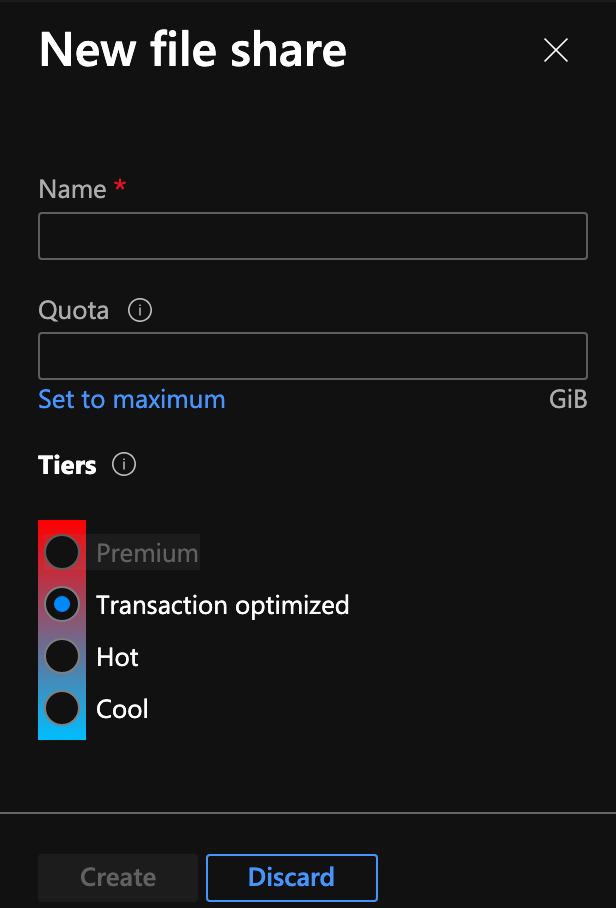
File share access tiers
Azure Files offers four different tiers of storage:
- premium,
- transaction optimised,
- hot, and
- cool.
Only premium uses SSD, the rest use HDD.
Other Features
- Azure CDN
- Static Website
- Data Protection (soft delete, versioning, point-in-time restore, snapshots, change feed)
- Immutable blobs
- Time-based retention policies
- Objects can be created and read, but not modified or deleted.
- After the retention period has expired, objects can be deleted but not overwritten.
- can be locked
- Both locked and unlocked policies protect against deletes and overwrites. However, you can modify an unlocked policy by shortening or extending the retention period. You can also delete an unlocked policy.
- You cannot delete a locked time-based retention policy. You can extend the retention period, but you cannot decrease it.
- scope: version-level or container level
- Legal-hold policies
- Objects can be created and read, but not modified or deleted.
- scope: version-level or container level
- Time-based retention policies
- CORS support: cross-origin resource sharing
Client Applications
The Azure SDKs are collections of libraries built to make it easier to use Azure services from different languages. The SDKs are designed to simplify interactions between your application and Azure resources. As your code interacts with Azure Storage resources, you can use client libraries to manage resources and work with data.
- Azure Storage client library
- LocationMode of a read request can have one of the following values:
- PrimaryOnly
- PrimaryThenSecondary (recommended)
- SecondaryOnly
- SecondaryThenPrimary
- When reading from a secondary location, the application should be able to handle stale data
- Retry Capability: Application should be able to handle transient errors
- Handle failed writes: for instance, primary is done, requests are getting redirected to secondary because LocationMode is PrimaryThenSecondary.
- Use Circuit Breaker pattern: After a certain number of failures, LocationMode should be changed from PrimaryThenSecondary to Secondary (failback to primary when it is back online)
- LocationMode of a read request can have one of the following values:
